| “ | If debugging is the process of removing software bugs, then programming must be the process of putting them in. |
| —Edsger Dijkstra[1] | |
Debugging is the process of fixing problems ("bugs") in code. It is a normal part of the coding process.[2]
Computer bugs have existed for centuries. Programmer Ada Lovelace first wrote about them in 1843, though she didn't use the word "bug." Inventor Thomas Edison later used the term "bug" to refer to problems or engineering defects. (Though we don't know if he coined the term or if he heard it from someone else.) Famously, programmer Grace Hopper and her team found a dead moth stuck in the Mark II computer when it was malfunctioning. She later told the debugging story, helping popularize the term.[3][4]
Types of bugs
Bugs have two possible sources:[2]
- Syntax errors: You made a typo or other mistake that breaks the rules of how code should work. For example, maybe there's an unclosed HTML tag or a semicolon missing in CSS.
- Logic errors: The code has no errors, but it doesn't do the thing you wanted it to do. For example, maybe you pasted the hex code for a blue color when you wanted green, and now you're confused why it's green.
A browser will try to fix missing closing HTML tags by adding them for you, but it may put them in the wrong place.[2]
Debugging strategies
Try re-reading documentation or online guides. Use human-written text (not AI), since this is more likely to be accurate.[5]
Sometimes, you might need to take a break. For example, if it's late at night, you might need to turn your brain off and on again. (This is also known as sleeping.) If it's not bedtime, maybe you need to get a drink of water or take a walk around the block. Returning with fresh eyes might be what you need.
If all else fails, and only a smaller part of your code is acting up, try deleting it entirely. Confirm that the bug is gone. Then rewrite the code from scratch. Sometimes, that's what it takes to rid yourself of a bug.
Rubber duck method
The "rubber duck" method is a popular way to debug code. Sometimes, expressing your problem in words can help you find the answer. But people aren't always available to listen. Here's how to use the rubber duck method:[6][7]
- Get a rubber duck (like the kind you use in a bathtub) and put it on your desk. If you don't have one, you can use something like a stuffed animal to be an honorary duck.
- Tell your rubber duck what your code is supposed to do, in general. Explain what is currently wrong with your code.
- Read your code line by line out loud. Explain to the duck what each line is supposed to do. Don't skip any details. (Remember, ducks can't read, so you must explain thoroughly.)
Eventually, as you tell your duck about the code, you'll notice something doesn't add up. There's a typo, or your code doesn't do exactly what you thought it did. There's your bug. Thank your duck and fix the bug.
Developers have been using this method for decades.
Temporarily changing your code
You can temporarily modify your code for debugging purposes. This includes things like:
- Comment out code to look for the bug. Split your code into a few "blocks" (e.g. Block A, Block B, Block C, etc.). Comment out the first affected block, "Block A." When you do this, is the bug gone?
- If so: The bug is probably in Block A. Split Block A into two or more smaller blocks. Comment out the first one. Repeat until you've narrowed it down.
- If not: Un-comment Block A. Now you know Block A isn't the cause of the problem. Comment out Block B, then Block C, etc. until you find the source.
- If you get confusing results: Remember that multiple blocks can have the same bug. For example, maybe Block A and Block C both have the bug, while Block B is bug-free. See if that could explain it.
- Add temporary styles to clarify structure. Adding temporary CSS (e.g. a red border or a teal background color) can help you see exactly where the box is.
Using the DOM inspector
- See also: Inspect element
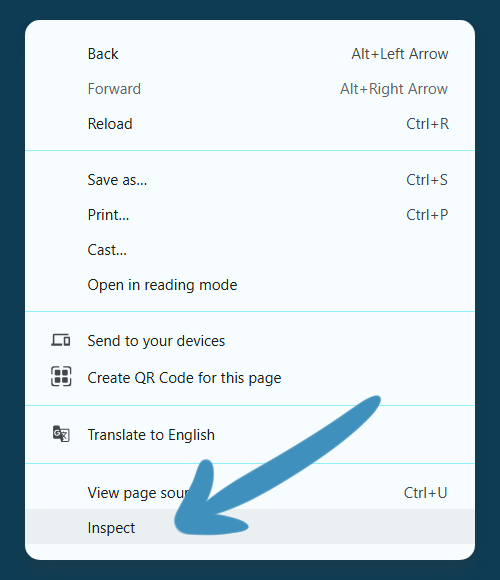

Right-click and look for an "Inspect" option.
You can inspect the HTML and CSS of any webpage in your browser. This can be helpful for debugging your code.
Most browsers let you open the inspector by right-clicking. Right-click the element you want to look at. Then hit "Inspect" or "Inspect element" from the menu. This opens the DOM inspector.
The inspector will show you the HTML that builds the code. It'll also show the CSS that is being applied to the element. Navigate around and look for hints about what's going on.
You can also see if the console has logged any errors. These might help you understand what went wrong.
Best practices
Coding for easy debugging
Certain habits can help make debugging easier and less frequent. You can:
- Comment your code carefully to explain what it does.
- Make one or just a few changes before previewing your code. That way, if you break something, you know it'll be something recent.
Start good habits. In HTML, type your closing tag right after typing your opening tag. This helps make sure you don't lose track of closing tags.
Avoiding or limiting AI
- For more on AI and code, see Artificial intelligence.
Some websites recommend using artificial intelligence (AI) to debug your code. While it may help sometimes, it also often produces buggy code.[8]
Research on AI is still new. But studies so far find that it worsens your ability to think for yourself. When you use AI, you have less brain activity.[9][10] Your motivation fades.[11] These effects linger even after you stop using AI.[10][12][13] In fact, after people start and then stop using AI, their performance tends to be worse than it was before they started.[12]
If you want to grow or keep your coding and debugging skills, it's probably best not to use AI tools.
See also
External links
- HTML Validator at W3C (note: doesn't check/understand WikiText)
References
- ↑ Quote from AZ Quotes
- ↑ 2.0 2.1 2.2 Debugging HTML, MDN
- ↑ Edwards, Benj. What Is a "Computer Bug," and Where Did the Term Come From?, How To Geek
- ↑ Wills, Matthew. The Bug in the Computer Bug Story, JSTOR Daily
- ↑ Tech Vision. Stop Using AI, Use These Proven Coding Practices instead, Dev
- ↑ Rubber Duck Debugging, RubberDuckDebugging.com
- ↑ David. Rubber Duck Debugging: The Psychology of How it Works, Thoughtful Code
- ↑ Yepis, Erin. Developers remain willing but reluctant to use AI: The 2025 Developer Survey results are here, Stack Overflow
- ↑ Chow, Andrew. ChatGPT May Be Eroding Critical Thinking Skills, According to a New MIT Study, Time Magazine
- ↑ 10.0 10.1 Hulscher, Nicolas. MIT Study Finds Artificial Intelligence Use Reprograms the Brain, Leading to Cognitive Decline, Public Health Policy Journal
- ↑ Liu, Yukun, Suqing Wu, Mengqi Ruan, Siyu Chen and Xiao-Yun Xie. Research: Gen AI Makes People More Productive—and Less Motivated, Harvard Business Review
- ↑ 12.0 12.1 Bastani, Hamsa and Bastani, Osbert and Sungu, Alp and Ge, Haosen and Kabakcı, Özge and Mariman, Rei, Generative AI Can Harm Learning (July 15, 2024). The Wharton School Research Paper, Available at SSRN: https://ssrn.com/abstract=4895486 or http://dx.doi.org/10.2139/ssrn.4895486
- ↑ Kumar, Harsh, Jonathan Vincentius, Ewan Jordan, and Ashton Anderson. Human Creativity in the Age of LLMs: Randomized Experiments on Divergent and Convergent Thinking (PDF), arXiv