Introduction
Headers are a WikiText coded item that defines a section in the text. You can see them a LOT on wiki pages/articles—the 'Introduction' header that you see on this page is one! They're also closely related to tables of content, which we'll explore in this guide too!
The Header Code
WikiText Headers
WikiText headers are made with equal signs (=). The more equal signs (=) a word has surrounding it, the smaller the header is, or it is a sub-header. Below you can see the codes and the result:
= Heading 1 =
== Heading 2 ==
=== Heading 3 ===
==== Heading 4 ====
===== Heading 5 =====
====== Heading 6 ======
Result:
Heading 1
Heading 2
Heading 3
Heading 4
Heading 5
Heading 6
As you can see, the more equal signs(=) surrounding the header words, the smaller it is. If you have a larger header (Like ==Heading 2==), and then a smaller heading (like ===Heading 3===), it would show up in the table of contents as heading 3 being a subcategory to heading two. Generally level 2 headers are sufficient for first-level headings, level ones can be overly large and in the way.
HTML and Wikitext Headers
This way works both in Wikitext, AND in HTML. Below you can see the codes and the result:
<h1>Heading 1</h1>
<h2>Heading 2</h2>
<h3>Heading 3</h3>
<h4>Heading 4</h4>
<h5>Heading 5</h5>
<h6>Heading 6</h6>
Result:
Heading 1
Heading 2
Heading 3
Heading 4
Heading 5
Heading 6
As you can see, the higher the number next to the 'h' in the tag, the smaller the heading! Avoid using <h1>, as it usually is bigger than necessary and clogs pages.
Table of Contents
All headings will appear in a box at the top of the page. To change the location of the table of contents, type in the following where you want it instead:
__TOC__
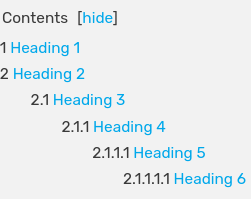

Result
To make the table of contents disappear entirely, type in:
__NOTOC__
To make the table of contents appear in more than one place, type in (wherever you want the Table of Contents):
__FORCETOC__
To make the table of contents appear on the right side of the page type in
{{TOCright}}
Tables of Content can be customized by adding a div or span style tag (with Attributes) before the __TOC__ markup.
When you type in one of the TOC markups, you will notice that the background of the words turns dark gray, and the words turn blue. This is a sure sign that you've typed it in right!
If you want to have a Table of Contents, but you don't want to have a certain header be displayed, you can create a 'fake' header by using a <big> tag before the header text, a </big> tag after it, and a horizontal line (<hr> tag or ---- ) below that.