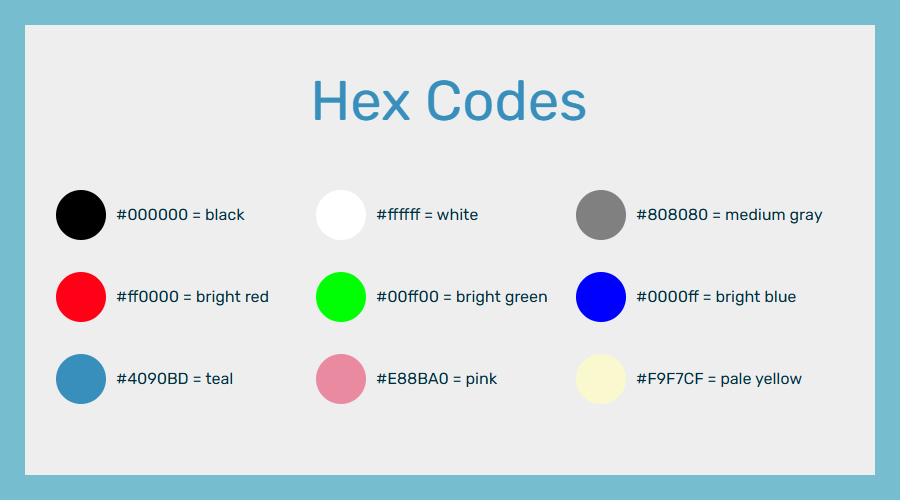

In HTML and CSS, hex codes are used to represent colors. The numbers and letters in the code correspond to RGB/RGBA color values. For example, #000000 is black and #ffffff is white.
"Hex" stands for hexadecimal. This means a base 16 number system (as opposed to decimal, which is base 10, or binary, which is base 2). The digits 0-9 in hexadecimal mean the same thing as they do in base 10 (our usual number system). Then, for digits 10-15, we use the letters a-f. Thus, a means 10, b means 11, and so on.
Hex codes are not case-sensitive. For example, both #FFFFFF and #ffffff are white.
How hex codes work
Hex codes translate to RGB/RGBA values (but they're easy to copy-paste). For each digit, a value of 0 means no color, a value of f is maximum color, and the values 1-e represent values in between.
The first two digits represent how much red is in the color. The second two represent how much green is in it, and the last two represent how much blue is in it.
You can use hex codes to represent any color you'd like.
When you look at a hex code, you can sometimes guess what a color might look like. For example, #4090BD has not much red (40), a medium amount of green (90), and a lot of blue (BD). That color is teal.
Three-digit hex codes
You can also use three-digit hex codes. These codes use one digit for each R, G, and B value instead of two. They expand to the same digit being repeated twice. (For example, #abc = #aabbcc.)
Adding an alpha channel
You can represent an "alpha channel" in hex code. "Alpha" means transparency. You represent this by adding an extra value at the end. If your hex code has 2 digits per channel (r, g, and b), then you'll use 2 digits for alpha. If it has 1 digit per channel, then you'll use 1 digit.
Let's show how that looks.
Getting a hex code
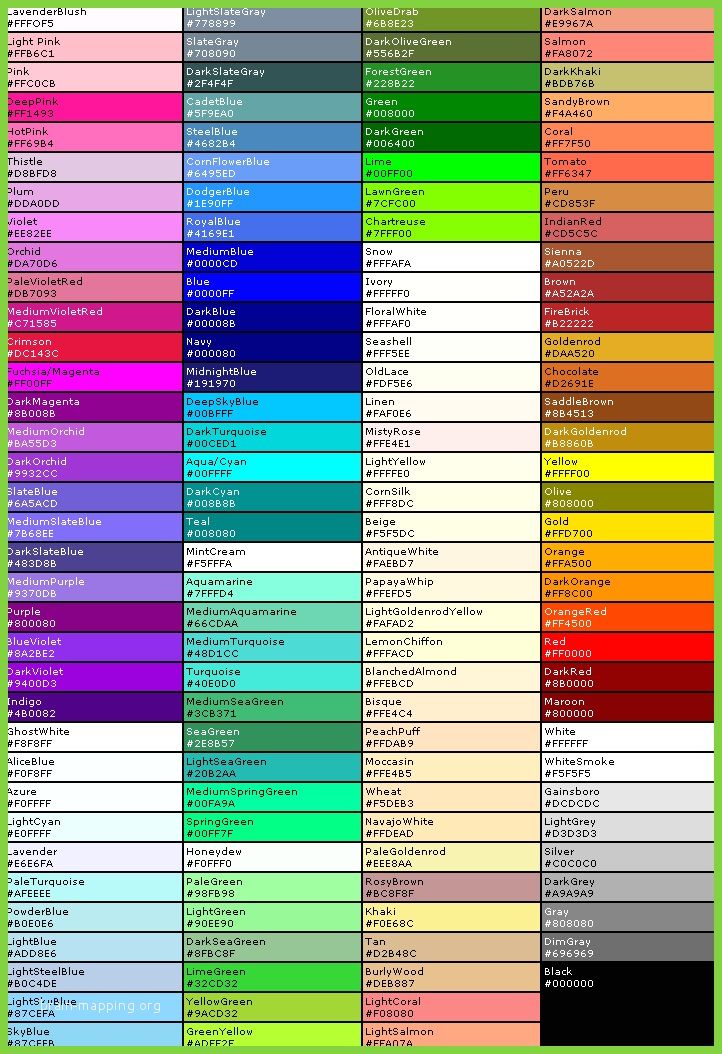
There are different ways to get the hex code you want:
- Use an online color picker or list.
- Use a graphics program, like Photoshop or Clip Studio, which will let you see a color's hex code. (This can be handy if you want colors that match some art you're adding, or if you made a mockup in a graphics program first.)
- Write it yourself, then fiddle with it until you like the results.
As you work on your web design skills, you will eventually come up with a favorite way to get colors.
Using hex codes
Hex codes can be used anywhere colors are used. Here are some examples of hex colors used in CSS:
Best practices
- See also: Color theory and Accessibility
Consider color theory and accessibility as you choose your colors. These will help you choose colors that are appealing and won't clash or cause headaches.
Here are some things to consider:
- Avoid bright neon colors, since these can hurt the eyes of visually sensitive people. Use calm colors without too much saturation.[1]
- Remember colorblind users. Don't rely on color alone to convey information. Use words too.[2][3][4]
- Use readable contrast with text. Text should be easy to read against its background.
- On Fandom, some users use dark mode and some use light mode. Make sure the colors work in both modes. (For example, if you are using a background color, make sure to specify a text color too.)
Colors should never overwhelm, distract, or confuse users. Instead, they should create an appealing experience.
See also
- Color theory
- HSV
- Named Colors
- RGB/RGBA
External links
You can also go to W3schools for a list of color names and their hex codes.
References
- ↑ Frankowska-Takhari, Sylwia; Hassell, Jonathan; Autism Accessibility Guidelines research project (PDF), Hassell inclusion and National Autistic Society
- ↑ Accessibility tool audit, AlphaGov.GitHub.io
- ↑ Evans, Darrielle. A web accessibility checklist to make your content 100% compliant, HubSpot blog
- ↑ How to Meet WCAG (Quick Reference), w3 Web Accessibility Initiative