Barnstars are wiki awards celebrating great contributions. They recognize good work and build community spirit. Any user can award a barnstar to someone else.
Barnstars are made using a template like {{Barnstar}}. The giver puts the template on a recipient's profile page and fills out the parameters to say why they are giving it. Usually, the giver also makes a forum post announcing the barnstar. That way, the community can celebrate.
 |
|
Reasons why people give barnstars
A barnstar celebrates when a fellow user goes "above and beyond" somehow. It could be a single amazing thing they did or a bunch of little things that add up to something wonderful. Example reasons include:
- They wrote an amazing article (or a lot of them)
- They coded something great for the wiki
- They made lots of good edits (whether it was text edits, categorizing, etc.)
- They answered coding help requests really nicely
- They are making the community a better place (welcoming new users, helping others, creating a positive culture, etc.)
You aren't limited to the list above, of course.
How to give a barnstar
Note: These instructions describe our wiki's {{Barnstar}} template and setup. It may be a little different on wikis that use different templates.
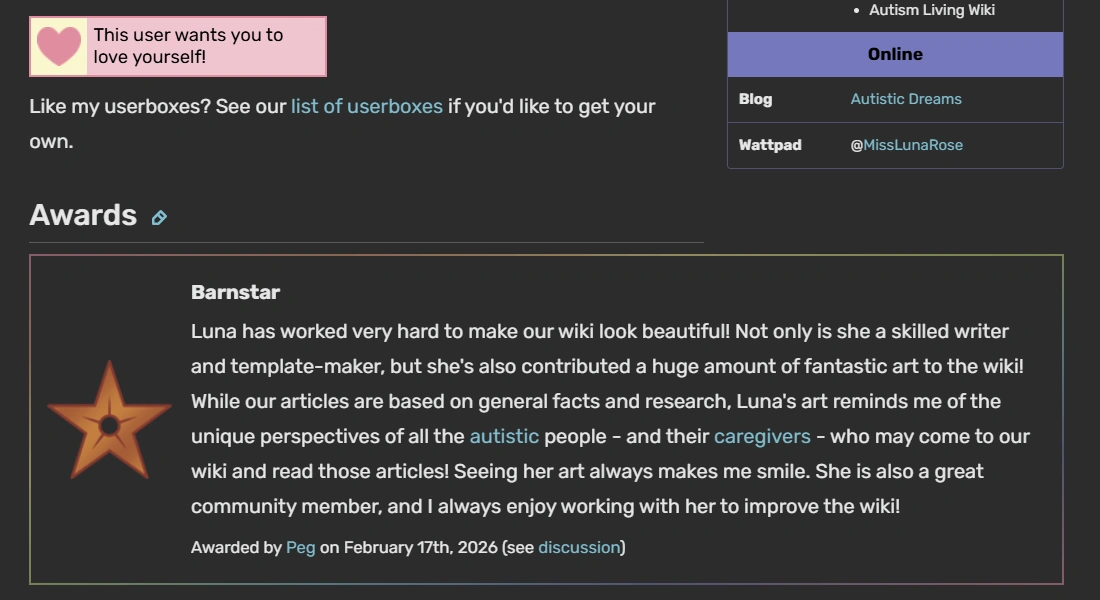

A barnstar in the "Awards" section of a user's profile page at the Autism Living Wiki. (Click the image if you want to see it up close.)
You can grant barnstars on any wiki where there's a {{Barnstar}} template. Here's how:
- Go to the profile page of the user you want to celebrate. Edit their page.
- While it's usually rude to edit another user's page, barnstars are a happy exception.
- Scroll down to the "Awards" section of their page. (This is under a heading called "Awards.") If there isn't one yet, you can make it.
- In the top menu bar, go to Insert > Template.
- In the search bar, star typing "Barnstar." Select the barnstar template.
- Fill out the fields.
- Barnstar type: Pick the general one or a specific type.
- Reason: Write a few sentences about why they deserve a barnstar.
- Your name: To make it clear who gave the barnstar
- Date: Today's date
- Forum post URL: Leave this blank at first. (You'll come back to it soon.)
- Save your changes.
- Go to the wiki's discussions. Make a new post announcing the barnstar. Here is an example post.
- Try copy-pasting the reason you wrote in the barnstar template as part of the post.
- Tag the user using the @username format, e.g. @JaneDoe, to make sure they see it.
- Return to their profile page. Edit it and select the barnstar you added. Put the URL of the forum post you made in the forum post URL field.
- Save. You did it!
Generally, you don't edit a barnstar after you give it and add the forum post link. However, you might edit it if you find a typo or mistake. Or, if a user's name/pronouns change, the barnstar text can change to reflect that.[1]
How to add barnstars to a wiki you love
Maybe another wiki you love doesn't have barnstars, but you think it should. You can add our {{Barnstar}} template. Here's how:
- Download our barnstar images. Upload them to your wiki.
- Do this at Special:NewFiles. Use the "More Options" option to credit the original artist(s) in the caption spot. (You can find the artist name(s) when viewing the file on our site.) This is respectful of their work.
- Make a new page named
Template:Notice box. (The barnstar template will use this.)- Alternative: If you are decent at coding templates, and if your wiki has a similar template like Ambox, you can use that instead. You are welcome to modify the barnstar template code to use something different.
- Copy-paste the code from our {{Notice box}} into the page. Edit it as desired. For example, you might:
- Change the category to suit your wiki's category scheme
- Edit the border gradient or color to match your wiki's color theme
- Make any other tweaks that seem right
- Preview and save the notice box template. If it looks good, you're ready to move forward.
- Make a new page named
Template:Barnstar. - Copy-paste the code from our {{Barnstar}} template into the page.
- Edit the barnstar template however you like. Here are some examples of changes you might make:
- If you're using .webp files instead of .png files (which can happen with Fandom), make sure to change the image URLs to .webp files.
- Categorize the page somewhere that fits with your wiki's categories. That might be Category:Templates or somewhere else.
- Consider editing or adding to the types of barnstars users can grant. For example, maybe you want to create a new type of barnstar to award people.
- Preview and save the template.
- Consider writing a page about barnstars for the wiki. For example, you might call it "Wiki barnstars" or "Wiki Name:Barnstars." Feel free to use our barnstar page as inspiration.
- Optional but recommended: Award the first barnstar to a cool user! Announce it in the forums and celebrate with the community.
Barnstars on the Coding Help Wiki
The Coding Help Wiki includes barnstars to celebrate great contributions. If you see someone doing something great, feel free to award them a barnstar!
| Image | Name | What it's for |
|---|---|---|

|
General Barnstar | This type can honor any awesome contribution. It works if you don't know what to choose, if you want to describe lots of things, or if none of the below options seem to fit. |

|
Wonderful Writer Barnstar | Award this to users who do great writing. That can mean writing helpful content, making good edits, or even fixing spelling/grammar. |

|
Outstanding Organizer Barnstar | Award this to people who organize the wiki. This can include adding links, adding categories, or other helpful things. |

|
Caring Community Member Barnstar | Award this to people who help the community. This can mean answering questions, welcoming newbies, and otherwise making this a friendlier place. |
Q&A
Here are some questions you may have and their answers.
How do I get a barnstar?
Maybe you saw that shiny star badge and it makes you want one. Totally normal! Lots of people like recognition and/or shiny things.
There is no guaranteed way to get a barnstar. But it can help to:
- Make great edits. Maybe you want to start new articles or improve existing ones. Add quality information, organize, or fix up spelling/grammar.
- Contribute great code. Make awesome templates or examples that help people.
- Help other people. Answer requests for help. Give advice.
- Give barnstars to others. This is a way to promote community spirit. Of course, only give these to people who earned them!
Barnstars award great work. So doing great work and using your strengths will increase your chances.
Please don't ask other people to give you barnstars. That can make them uncomfortable.
May I create new types of barnstars on the Coding Help Wiki?
| Coding Help Wiki |
|---|
| Overview |
| Community |
|
| Help us |
Absolutely! MissLunaRose created our first few barnstar images and types, but they don't only have to come from her. Anyone who can edit template code can add new barnstar types.
To add a new type of barnstar, you'll need basic familiarity with template data, parameters, and parser functions like #switch. This way, you can edit these without breaking them.
Here's how to do it:
- Make your new barnstar image. You can use our basic barnstar image as a base[2] or make your own from scratch.
- Upload it to the wiki and give it a good name. For example, "Terrific Template Maker Barnstar.png"
- Edit the {{Barnstar}} template.
- In the switch statement for the image parameter, add your barnstar's name and image. For example,
|Terrific Template Maker = Terrific Template Maker Barnstar.png - Preview to make sure nothing broke. Debug until it looks good.
- Go to the template data and add the name of your barnstar as an option.
- Inside the "About" section in the noinclude tags, find the example barnstars. Create a new example barnstar with the type you just invented. This helps you check that it's working properly. It also might be helpful when other users visit the page.
- Once everything looks good, save.
- Now edit our "Barnstars" page (which you're reading right now). Add your type of barnstar to the table of barnstar types.
- Optional but recommended: Award the new barnstar type to a wiki user who deserves it!
If you need help, try asking the wiki admin team or posting in the forums.
See also
External links
- Barnstars at The Wiki Wiki
References
- ↑ Wiki barnstars, Autism Living Wiki
- ↑ MissLunaRose officially grants wiki users permission to use her barnstar image as a base. Have fun!