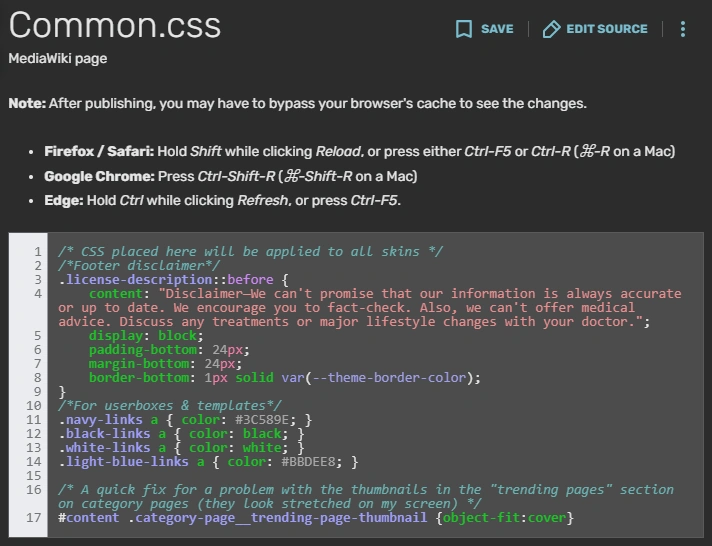

Example: the Common.css of the Autism Living Wiki in May 2026
Customizing a wiki you admin can help you make it look its best. Tools like CSS, JavaScript, and templates can enhance your wiki. This guide will help you get started and ensure you know best practices for a great user experience.
Note: Just because you admin a wiki doesn't make it "yours." It belongs to the community. We're using the phrase "your wiki" for simplicity's sake.
Preparing to edit your wiki's appearance
Read Fandom's customization policy before you start.
Here are some tools to consider:
- CSS (for admins): This lets you style elements on the wiki.
- JavaScript (for admins): This lets you add interactivity and more complex features.
- Templates (for anyone): These let you structure content and add stylistic features.
Considerations
As you think about design and features, ask yourself:
- What do I want my wiki's theme to look like? What's my color scheme?
- What's my target audience? What might they want and need?
- Is my work accessible? Am I avoiding common pitfalls like clutter and distractions? Could a neurodivergent user have a good time using this site?
- Am I following best practices?
When you edit a wiki's CSS, the goal isn't to show off your skills or see how many features you can add. It's to make a good user experience.
Every change you make should benefit users, or at least be neutral. Solve problems; don't create them.
Editing wiki CSS (admins only)
Before adding CSS, make sure you understand CSS basics! That way, you can debug and tweak as needed.
When you're ready, you can begin making changes to wiki CSS. Only wiki admins have the permissions for this.
- Go to the Admin Dashboard. This is near the "Add new page" link.
- Find the "Desktop CSS" and "Mobile CSS" links.
- Begin making edits to both.
- After each edit, do a hard refresh on one or more wiki pages to see how the change looks. (The Common.css and FandomMobile.css pages will tell you how.)
It's important to preview each change individually after making it. That way, if one change introduces a bug or problem, you can fix it quickly.
We offer some free CSS snippets for modifying your wiki.
Editing wiki JavaScript (admins only)
Editing JavaScript must be done carefully. Mistakes could break the site or ruin user experience.
Luckily, there are a lot of pre-built JavaScript features you can install. These were coded by skilled people and have already gone through debugging and testing. They're available at the Fandom Developers Wiki.
Make sure every feature you add is something that actually benefits users. Again, your purpose is to provide a good user experience, not to add features because you can. The last thing you want is a bloated or cluttered page.
If you write your own JavaScript, Fandom staff will need to approve it. This process helps ensure you don't break anything accidentally or invite computer viruses.
Adding templates (any user)
Templates create re-usable blocks of text and/or code to help you structure and enhance pages. Templates can be used on articles, your homepage, user pages, and more. However, they don't work on message walls.
There are many kinds of templates that can enhance articles. These include:
- Hatnote templates, like {{See also}} and {{For}}, which help users find related topics
- Infobox templates, which describe details about a topic
- Design-related templates, like {{PicList}} and {{CSS demo divs}}, which add special visual features
You can find templates on our wiki or on the Templates Wiki. Then copy them over to your wiki.
User templates
You can also add fun templates for user pages. These can build community spirit and help users have fun with their pages. For example:
- Badge templates go on user pages. They describe things like friendships, clubs, and interests.
- Userboxes are small boxes for user pages. Each one includes a small fun fact about the user.
- Barnstars are wiki-related awards that users can grant to each other. They celebrate positive contributions like creating great pages or helping other users.
Best practices
Here are some tips as you explore your options:
- Accessibility and user experience always come first.
- Preview your changes often and repeatedly. Test them on multiple occasions.
- Comment your code.
- When in doubt, less is more. Don't overdo changes or features.
- Remember that if you add too many features, it can slow down page load times. This is especially true for users who don't have great internet connections.
Keeping these best practices in mind can help ensure your wiki is welcoming and wonderful to use.
See also
- Accessibility
- Blog: How to Begin Coding
- CSS
- JavaScript
- Templates
- User experience
- WikiNode
External resources
Fandom resources and policies
- Customization policy
- Help:CSS and JS customization
- Help:Web accessibility
- Help:Web accessibility/checklist
- Fandom Discord server
Other wikis
- Fandom Developers Wiki, which offers JavaScript, Lua, and CSS snippets and help
- Templates Wiki, which offers many free templates and has a template help desk
 Collaborative Fandom related wikis
|
Meta Fandom |
|---|